
Flash Tasks
Otilus helps you stay in control even when the unexpected happens, thanks to a dedicated feature: Flash Tasks. They allow you to note, delegate, or handle a quick action without creating a project, so you can efficiently manage everyday small urgencies.
What is a Flash Task?
A Flash Task is a simple, quick action that is not linked to any project. It is visible only to the people involved, making it the ideal tool for:
- personal reminders,
- quick requests between colleagues,
- urgent actions that do not require creating a project.
Create a Flash Task
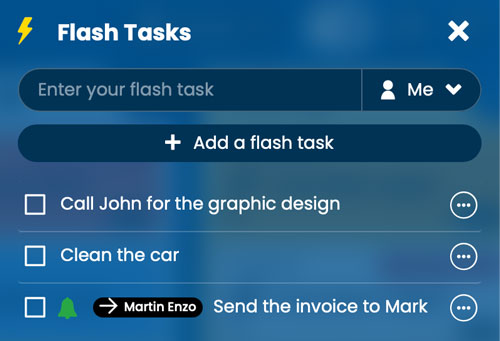
Click the marked with a lightning bolt to open the Flash Tasks window, then enter your action just like you would in a project card.
By default, the task is assigned to you and remains private. Example: “Don’t forget to buy bread.”
A checked task is considered completed: it automatically disappears the next day, keeping your list clean and relevant.
You can also edit a task by double-clicking on it.
Actions available on a Flash Task
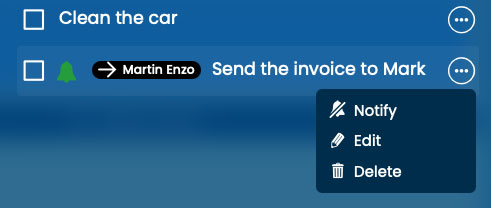
As in a project card, the action button allows you to:
- mark the task as completed,
- delete it if it is no longer needed.
- You can delete it if it is no longer useful.
Working as a team with Flash Tasks
Flash Tasks become especially useful in team environments. When creating one, you can select a recipient to assign the action to them.
Notifications and tracking
- Notification: the recipient receives an alert (if notifications are enabled). In Otilus, the Flash Tasks icon animates to indicate that a new action is waiting to be read.
- Visibility: only the person who created the task and the recipient can view, edit, or delete it.
- Tracking: once checked, the task appears as completed for both users.
Flash Tasks serve one purpose: handle the unexpected quickly without adding complexity to your organization. One simple action, one clear step, and your workflow stays smooth.