
Archive Cards
Why archive instead of deleting?
In Otilus, archiving a card is always safer than deleting it. Deletion is permanent and results in the complete loss of data.
Archiving, on the other hand, is safe and reversible: your card remains accessible at any time with its full history (except for attached documents, which are removed when the card is archived).
Archiving therefore allows you to keep a record of your work while keeping your boards clear and easy to read.
How to archive a card
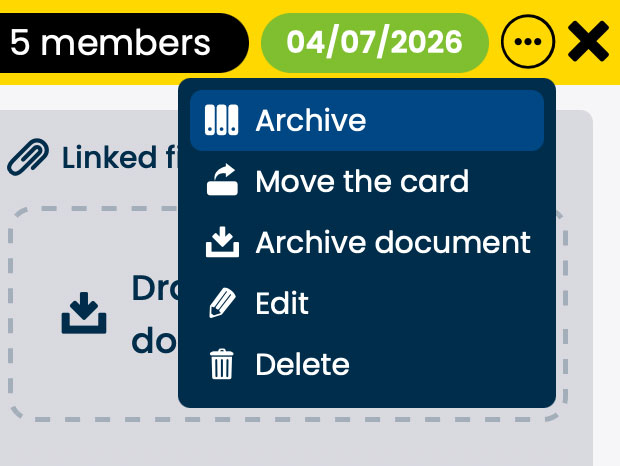
From within a card, click the action button (the [•••] icon at the top right), then select “Archive”.
The card is immediately moved to the manager’s archive area. It will remain there for 5 years from the date of archiving.
All information is preserved (tasks, comments, history…), except for attached documents, which are deleted when the card is archived.
Access archived cards
Open the menu and go to the “Archives” section.
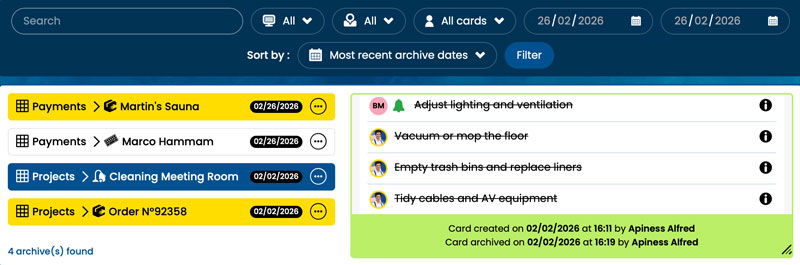
You can find your archived cards using filters and search: card name, type, team member, archive date, etc.
Click a card in the left column to display its full content on the right.
Restore a card
To restore a card, open its action menu […] and select “Unarchive”.
The card is automatically returned to its original board with all its content.
From the archives, you can also:
- Export the card’s full history (task log)
- Permanently delete the card if needed
Retention period and automatic deletion
Archived cards are kept for 5 years.
After this period, they are automatically deleted and cannot be recovered.
Remember to export any important data before this deadline if you wish to keep it.